
Les meilleures API de calendrier pour développeurs, startups et SaaS
Publié le
Notre équipe travaille depuis des années avec les principaux fournisseurs de calendriers : Google Calendar, Outlook et iCloud Calendar. Pendant cette période, nous avons développé nos propres intégrations d’API de calendrier pour chaque fournisseur et nous avons constaté à quel point il est difficile pour une startup ou une entreprise existante d’intégrer des calendriers dans son produit.
Intégrer des fournisseurs de calendriers est difficile parce que chacun propose sa propre API, et ces APIs sont différentes les unes des autres. Pour ajouter Outlook et Google Calendar à votre logiciel, vous devez implémenter deux APIs distinctes, chacune avec ses propres règles et limitations.
Dans cet article, nous présentons les meilleures APIs de calendrier qui facilitent l’intégration de tous les fournisseurs dans votre application.
Pourquoi choisir la bonne API de calendrier ?
Bien que la plupart des utilisateurs utilisent Google Calendar, un très grand nombre d’entre eux utilisent Outlook Calendar, iCloud ou une combinaison des trois, selon leur travail et leurs préférences personnelles.
C’est pourquoi il est important de prendre en charge tous les principaux fournisseurs lorsque vous créez une application, un produit SaaS, une startup centrée sur les calendriers, ou simplement une fonctionnalité qui permet à l’utilisateur de connecter son calendrier.
La bonne nouvelle, c’est que Google Calendar, Outlook et iCloud Calendar offrent des APIs publiques et gratuites pour travailler avec le calendrier d’un utilisateur. Grâce à ces APIs, vous pouvez lire les événements d’un utilisateur et créer, mettre à jour ou supprimer des événements, selon votre cas d’usage.
L’inconvénient d’intégrer plusieurs fournisseurs de calendriers est qu’ils ne suivent pas les mêmes conventions d’API. Les développeurs doivent implémenter chaque fournisseur séparément, ce qui coûte cher, car chaque API possède ses propres instructions et ses propres cas particuliers.
En plus de l’implémentation initiale, il faut aussi maintenir chaque intégration, car les fournisseurs de calendriers modifient leurs APIs de temps en temps.
Avec la bonne API de calendrier, votre entreprise peut intégrer tous les fournisseurs via une seule API. Cela réduit les coûts de développement et de maintenance et, surtout, vous permet de livrer de nouvelles fonctionnalités plus rapidement.
Quelles sont les meilleures APIs de calendrier ?
1. Apiroc
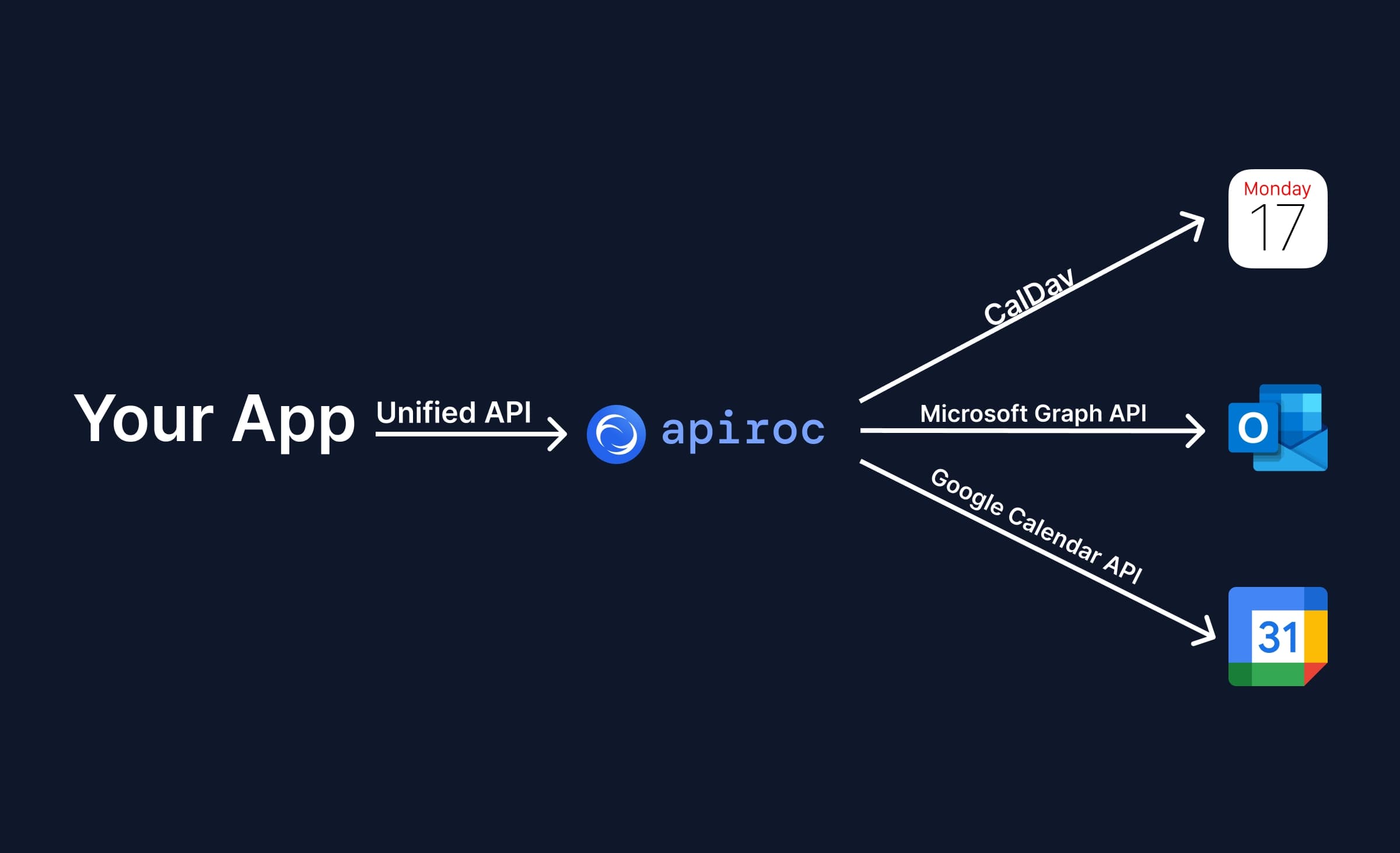
Apiroc est une API de calendrier unifiée créée par une équipe qui travaille depuis des années avec tous les principaux fournisseurs de calendriers. Nous avons construit des intégrations de calendrier qui traitent des milliards d’appels d’API, et nous avons réalisé que nous pouvions proposer au marché une API de calendrier unifiée plus simple et plus abordable.
La proposition est simple : Apiroc vous permet d’intégrer Google Calendar, Microsoft Outlook (Office 365, Exchange, Outlook.com) et Apple iCloud Calendar via une seule API. Plus besoin d’apprendre et d’implémenter plusieurs APIs, ni de gérer les cas particuliers et les pièges de chaque fournisseur.
Confiez-nous la maintenance et concentrez-vous sur l’essentiel : livrer plus vite et faire grandir votre base d’utilisateurs.
Fonctionnalités
- Une seule API pour Outlook, Google Calendar et iCloud Calendar : Apiroc offre une API unique pour tous les principaux fournisseurs de calendriers. Vous pouvez ainsi intégrer tous les fournisseurs rapidement, sans coder ni maintenir chacun d’eux séparément.
- Prise en charge de toutes les principales opérations de calendrier : L’API de Calendrier Unifiée Apiroc est conçue pour tout type d’application, des applications de calendrier et outils de planification aux CRM, systèmes RH et agents IA. Elle prend en charge la création, la lecture, la mise à jour et la suppression d’événements, les participants et les réponses aux invitations, les événements récurrents avec modification d’une seule occurrence, les métadonnées personnalisées, les liens de visioconférence, ainsi que la disponibilité libre/occupé sur plusieurs calendriers et fournisseurs en une seule requête. L’API est unifiée : vous obtenez les mêmes endpoints et le même comportement pour tous les fournisseurs.
- Une API de calendrier facile à démarrer et à intégrer : Dès votre inscription, vous recevez une courte liste d’étapes pour intégrer l’API dans votre base de code. L’authentification repose sur une simple clé d’API, les utilisateurs finaux connectent Google et Microsoft via un flux OAuth hébergé, et iCloud se connecte avec un identifiant Apple et un mot de passe spécifique à l’application, sans configuration OAuth.
- Documentation, SDK et collection Postman : Apiroc dispose d’une documentation concise, d’un SDK Node.js officiel, d’une application d’exemple sur GitHub et d’une collection Postman qui vous permet de tester immédiatement l’API et ses fonctionnalités.
- Fiable et bien accompagné : Apiroc repose sur une infrastructure qui a déjà traité des milliards d’appels d’API de calendrier, avec des nouvelles tentatives automatiques, la gestion des limites de débit des fournisseurs et un basculement en cas de panne. Notre équipe travaille avec les calendriers depuis des années et fera tout son possible pour vous aider en cas de problème ou de demande.
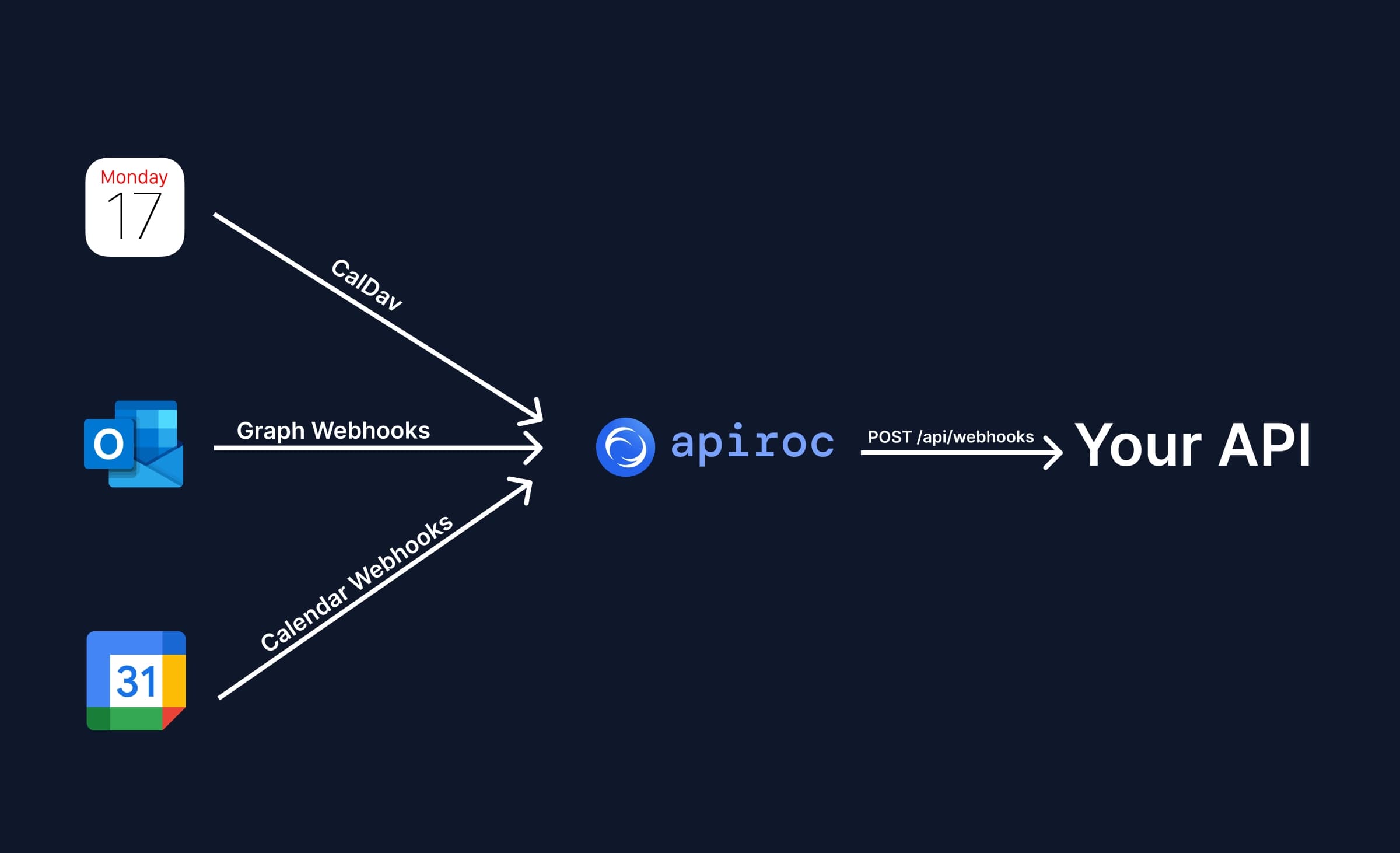
- Prise en charge des Webhooks : Vous n’avez pas besoin d’intégrer des webhooks pour chaque fournisseur de calendrier. Apiroc envoie à votre application des notifications webhook signées et en temps réel pour les changements dans les calendriers Google et Microsoft. Les webhooks pour iCloud Calendar sont prévus.
Fournisseurs de calendrier pris en charge
- Google Calendar
- Outlook Calendar
- iCloud Calendar
Tarifs
Apiroc propose un forfait gratuit avec jusqu’à 10 End User Accounts, des requêtes API illimitées, les webhooks et les métadonnées, pour un usage hors production. Le forfait Pro coûte 25 $ par mois, inclut 50 End User Accounts, puis 0,50 $ par End User Account supplémentaire et par mois, avec un usage en production et 300 requêtes par seconde. Les forfaits Enterprise offrent des tarifs sur mesure, des remises sur volume et des limites de débit personnalisées. Un End User Account est un compte fournisseur connecté (par exemple un compte Google), qui peut contenir plusieurs calendriers.
2. Nylas Calendar API

La Nylas Calendar API est une plateforme orientée planification, conçue pour les développeurs qui souhaitent créer des solutions de planification personnalisées sans se soucier des différents fournisseurs de calendriers.
Fonctionnalités
- Workflows personnalisés : avec la Nylas Calendar API, configurez des parcours de planification adaptés à votre cas d’usage.
- Webhooks : recevez des notifications en temps réel lorsqu’un événement est planifié.
- Planifications un-à-un, collectives ou en tourniquet : implémentez facilement des réservations simples comme des scénarios plus complexes, par exemple la planification en tourniquet.
- Composants natifs : Nylas propose des composants de planification à intégrer dans votre site web et à personnaliser selon votre marque.
Inconvénients de la Nylas Calendar API
Le principal inconvénient de la Nylas Calendar API est qu’elle est très axée sur la planification. Si vous souhaitez simplement intégrer plusieurs calendriers dans votre application, ou si votre cas d’usage ne tourne pas autour d’un planificateur intégré, une alternative comme Apiroc peut être plus adaptée.
3. Cronofy Calendar API

Comme Nylas, Cronofy propose des APIs de calendrier pour les entreprises qui ont besoin de fonctionnalités de planification dans leurs applications.
Fonctionnalités
- Planificateur intégré : intégrez facilement un planificateur entièrement géré dans votre application, par exemple un bouton qui ouvre une fenêtre où l’utilisateur réserve sa réunion.
- Workflows : Cronofy vous avertit lorsqu’un créneau est réservé, replanifié ou annulé. Vous pouvez aussi recevoir ces changements via webhooks.
- Interface personnalisable : le planificateur intégré peut être adapté à votre identité visuelle.
Inconvénients de la Cronofy Calendar API
La Cronofy Calendar API est idéale pour créer des solutions de planification en marque blanche, mais elle montre ses limites pour les besoins qui ne sont pas spécifiques à la planification.
4. Cal.com API

L’API Cal.com permet aux développeurs et aux entreprises d’ajouter la planification à leurs applications grâce à des composants personnalisables.
Fonctionnalités
- Composants atomiques : du bouton « Connecter Google Calendar » au formulaire de réservation complet où l’utilisateur choisit son créneau.
- Paiements : intégrez Stripe pour encaisser vos réservations.
- Interface personnalisable : en plus d’être modulaires, les composants s’adaptent à votre marque.
- Prêt pour React.js : installez simplement le paquet "@calcom/atoms" .
Inconvénients de l’API Cal.com
Cal.com se concentre sur la manière la plus simple de créer des solutions de réservation. Si vous cherchez une API de calendrier indépendante de la planification, qui communique avec tous les calendriers, Apiroc est sans doute le meilleur choix.
5. Calendly API

Calendly est la solution de prise de rendez-vous la plus populaire, utilisée par des millions d’étudiants, de professionnels et d’entreprises. Son API REST permet d’intégrer vos liens Calendly à votre site web, de partager des liens de réunion, de consulter les disponibilités, et plus encore.
Fonctionnalités
- Automatisations d’événements : abonnez-vous aux webhooks Calendly pour être averti lors des réservations, annulations ou replanifications.
- Intégration des pages de réservation : intégrez vos pages de réservation Calendly dans votre application et personnalisez leur apparence.
- Accès aux données d’événements et d’invités : utilisez des requêtes POST pour recevoir les informations en temps réel via webhooks, et des requêtes GET pour consulter les événements.
- Disponibilités : récupérez par API toutes les plages horaires disponibles pour un type d’événement, un calendrier ou un utilisateur.
Inconvénients de l’API Calendly
L’API Calendly est centrée sur la gestion des types d’événements, des réservations et des disponibilités Calendly. Elle n’est pas conçue pour unifier plusieurs calendriers dans une seule API ni pour créer des solutions complexes sur mesure.
6. Google Calendar API

Par rapport aux autres fournisseurs, Google Calendar propose la meilleure API de calendrier en matière de conventions, de documentation et de facilité d’implémentation.
Avec l’API Google Calendar, vous pouvez lire, créer, mettre à jour et supprimer des événements, consulter les disponibilités, et plus encore. L’API gère les événements uniques et récurrents, et prend bien en charge les rappels et les invitations.
Fonctionnalités
- Facilité d’utilisation : Google a soigné la conception de l’API, avec des endpoints clairs et fiables.
- CRUD complet : presque tout ce qui est possible dans l’interface l’est aussi via l’API.
- Webhooks : Google Calendar vous avertit lorsqu’un calendrier change, pour que vous puissiez réagir.
- Propriétés étendues : ajoutez des données personnalisées aux événements sans les stocker dans votre propre base de données.
Quelle API de calendrier devriez-vous utiliser ?
La meilleure API de calendrier dépend de votre cas d’usage et de vos besoins.
Si vous souhaitez intégrer tous les fournisseurs de calendriers via une seule API, Apiroc est le meilleur choix.
Si vous avez besoin d’une API spécifique à la planification, avec la possibilité d’intégrer un calendrier ou un formulaire de planification, Nylas et Cronofy sont les meilleures options.
Si vous avez simplement besoin d’intégrer un formulaire de réservation dans votre site web, vous pouvez essayer les APIs de Cal.com ou Calendly, qui permettent toutes deux d’intégrer et de personnaliser l’expérience de réservation.
Utilisez Apiroc
Apiroc est l’un des produits d’API de calendrier unifiée les plus abordables en 2026. Le forfait gratuit inclut jusqu’à 10 End User Accounts sans carte de crédit, et le forfait Pro commence à 25 $ par mois. Vous pouvez commencer gratuitement, tester l’API, puis passer à un forfait payant lorsque vous êtes prêt pour la production.