The Best Cronofy Alternatives in 2026
Published on
Cronofy is a scheduling platform that offers scheduling infrastructure and a Unified Calendar API. It supports iCloud Calendar, Google Calendar, Outlook, Zoom, and other integrations.
With Cronofy, you can build scheduling features on top of the Cronofy scheduling API, or build your own application from scratch using the calendar API.
In this article, we list the best Cronofy alternatives and look at their core features, pricing, and limitations.
What are the main Cronofy features?
Before we look at the alternatives, it helps to understand the core Cronofy features. That way we know which part of Cronofy each alternative replaces.
The main Cronofy features are:
- Calendar API : One API that connects to Google, Microsoft 365/Outlook, iCloud Calendar, and more. Your app can create, read, and update events, and receive real-time push notifications to stay in sync.
- Availability API : Checks several calendars at once and returns free time slots for people, rooms, or resources, so you can build "find-a-time" or resource-booking flows.
- Scheduler : Ready-made booking links and trackable Smart Invites. Invitees pick a slot, Cronofy writes the event, and attendee responses are kept up to date.
What are the best Cronofy alternatives in 2026?
1. Apiroc
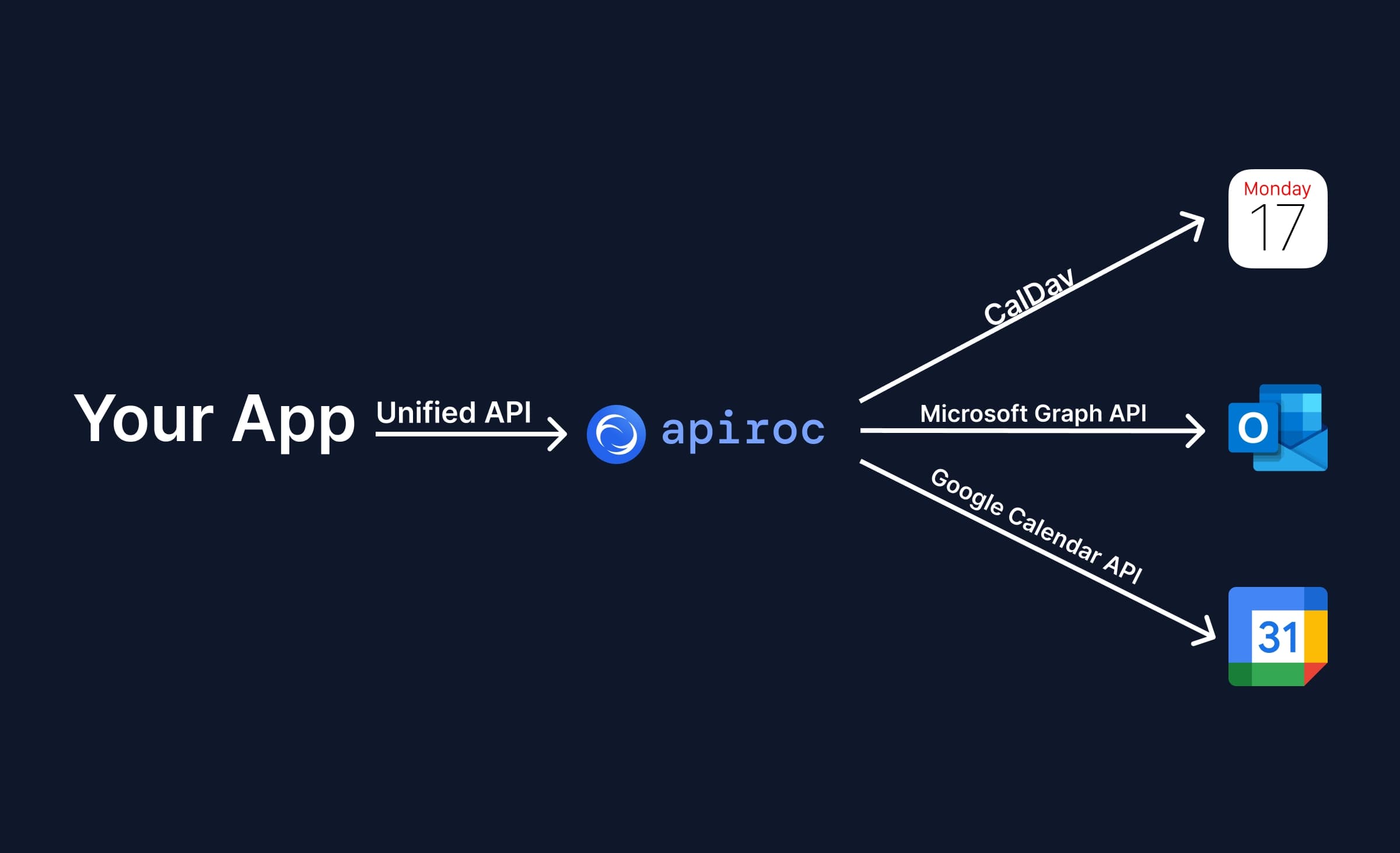
Apiroc is a Unified Calendar API that lets you integrate Google Calendar, Microsoft Outlook (Office 365, Exchange, Outlook.com), and Apple iCloud Calendar into your application with a single API.
Apiroc Features
- Unified Calendar API : One API for all the major calendar providers. The main offerings are:
- Google Calendar, Outlook Calendar, and iCloud Calendar support.
- Full support for calendar events: create, read, update and delete events, manage attendees and RSVPs, handle recurring events with single-instance changes, attach custom metadata, and add conferencing links.
- Free/busy availability across calendars and providers in one request, plus sync tokens and pagination for incremental sync.
- Generic API: the Apiroc Calendar API is meant to be the backbone of any application that talks to calendars. You can use it to build a calendar app, a scheduling app, a tasks app, or a calendar feature inside your existing product.
- Webhooks : Real-time notifications for Google and Microsoft calendars, with signed payloads, so you do not need to poll those providers or write a different handler for each one. Webhooks for iCloud Calendar are planned but not available yet.
- Simple authentication : End users connect Google and Microsoft through a hosted OAuth2 flow, and you can bring your own OAuth credentials. Apple iCloud connects with the Apple ID email and an app-specific password through an API call, so no OAuth setup is needed.
- Developer experience : An official Node.js SDK, a Postman collection, concise documentation, and an example application on GitHub help you get started fast.
- Affordable pricing : Many Unified Calendar API products are too expensive for bootstrapped or early-stage startups. Apiroc focuses on the essential features you need to integrate every calendar provider through one API, at a modest price.
Apiroc Pricing
Apiroc charges per End User Account. An End User Account is one connected provider account (for example one Google account), which can contain multiple calendars.
- Free ($0 /month) : Up to 10 End User Accounts, unlimited API requests, 20 requests per second, webhooks and metadata. For non-production use, and no credit card is needed.
- Pro ($25 /month) : 50 End User Accounts included, then $0.50 per End User Account per month. Production use, 300 requests per second, and priority support.
- Enterprise (custom pricing) : Volume discounts, custom rate limits, and a dedicated Slack channel.
2. Nylas

Nylas is a Cronofy alternative that offers scheduling and calendar API features, and on top of that a contacts API and an email API.
Nylas Features
- Calendar API : Integrate multiple calendar providers (iCloud, Google Calendar, and Outlook) using a single API, with CRUD operations on calendars and access to free/busy times.
- Email API : A single API for all email platforms. You can read, search, and track emails across Gmail, Outlook, IMAP, and more, with extras like bounce detection and scheduled send.
- Contacts API : Gives your app access to users' address books, so it can read, add, edit, or delete contacts and groups on every major provider.
- Scheduler : Ready-made booking pages and embeddable components that show live availability, handle time zones, support round-robin or collective meetings, send reminders, and write events back to the calendar.
Nylas Pricing
Nylas charges based on the number of connected accounts. For fewer than 100 connected accounts, you pay $3.30 per connected account per month. The monthly plan seems to keep the same price per connected account no matter how many accounts you select, which might be a bug on the pricing page. With annual pricing, the price per connected account drops as the number of accounts grows. For example, above 50,000 connected accounts the price falls to $0.90 per connected account per month. Note that this is only the entry plan, and there are more expensive tiers as well.

3. Cal.com

Cal.com is an appointment scheduling platform. Unlike Cronofy, it does not have a unified calendar API yet, but it offers scheduling infrastructure that is similar to Cronofy.
Cal.com Features
- Calendar integrations : Connects with Outlook, iCloud Calendar, Google Calendar, and on-premises calendars, so any meeting you book or change is reflected on every linked calendar.
- Booking links & scheduling pages : You can create a shareable link where guests pick a slot. Once booked, the event is created on all calendars and stays updated if it is moved or cancelled.
- Availability search : The platform looks at one or many calendars and returns only the times that are really free, which powers "find-a-time", collective, or round-robin meeting flows.
- Webhooks : Cal.com can send a webhook when an event is created, changed, or deleted, so your app or automation reacts right away without polling.
Cal.com Pricing
Cal.com has two pricing plans: the Team plan, which lets you invite your team and share individual or collective scheduling links, and the Platform API pricing, which gives you access to the Cal.com API.

4. Aurinko

Aurinko is a product similar to Nylas. It offers Email, Calendar, Contacts, and Tasks APIs.
Aurinko Features
- Calendar API : One REST endpoint to read, create, update, and sync events across Google, Outlook, iCloud, and Exchange, with webhooks for instant updates and full support for recurring events.
- Booking & Availability API : Like Cronofy, it collects free times from multiple calendars (single or group) and books meetings automatically, covering round-robin, collective, and resource scheduling out of the box.
- Unified Mailbox API : The same interface covers email, contacts, and tasks, so your app can read, send, and sync all mailbox data without provider-specific code.
- Webhooks API : Sends real-time push notifications for any change in calendars, email, contacts, or tasks, so you do not have to poll.
- CRM Sync Automation : Aurinko has a built-in engine that captures email and calendar activity and writes it into CRM records automatically, which can save months of custom sync work.
Aurinko Pricing
Aurinko pricing starts at $1 per account and goes up to $2 per account if you want unlimited data transfers. CRM Sync has a different pricing structure than the API.

5. Unified.to

Unified.to is a Unified API platform with hundreds of integrations, including calendars, email, and more. What makes it different is that Unified.to integrates with SaaS platforms, not only with calendar or email providers.
Unified.to Features
- Calendar API : One API to read, create, and update events, and even pull transcripts, across different calendars and meeting tools in a single schema. Unified.to integrates not only with Outlook, Google Calendar, and iCloud, but also with Cal.com, HubSpot, Calendly, and more.
- Scheduling features : Checks free/busy status for individuals or teams and works with booking links from Calendly, Cal.com, and other services to book meetings instantly.
- Real-time Webhooks : Native and virtual webhooks push instant updates whenever events or links change, so you never have to poll.
- Hosted Auth Flow : Their auth flow handles OAuth 2, tokens, scopes, and refreshes for every provider, so users can connect accounts through a safe flow.
Unified.to Pricing
Unified.to starts at $350 per month, which includes up to 50,000 API calls per month. If your app needs more API calls, you will have to upgrade to a higher tier.

Which is the best Cronofy alternative?
Cronofy offers both scheduling and unified calendar APIs, so the best alternative depends on which set of Cronofy features you want to replace.
If you only want a single API to integrate multiple calendar providers into your application, Apiroc is a great alternative.
If you want to offer the most customizable scheduling experience to your users, you can self-host Cal.com or use the Nylas scheduling features to build a custom scheduling solution.
Aurinko and Unified.to are also worth considering, depending on your budget, since some platforms charge based on API usage and others based on connected accounts.
Use Apiroc
Integrating multiple calendars into your application is now easier than ever. Sign up for Apiroc and get a Unified Calendar API that is easy to use and maintain. The Free plan includes up to 10 End User Accounts, and the Pro plan starts at $25 per month, a fraction of the price of most alternatives.