
How to integrate iCloud Calendar API into your app
Published on
In a previous article, we explained how to integrate Google Calendar API into your app and walked through every step needed to make the integration work.
Integrating iCloud Calendar is not as straightforward as Google Calendar. The documentation is thin, and Apple has not put much effort into explaining what a developer needs to do to connect iCloud Calendar to an application.
In this article, we take a deep dive into how to integrate the iCloud Calendar API into your application. We cover authentication, supported operations, limitations, code snippets, and tools that make the integration easier.
What protocols and standards does Apple iCloud Calendar use?
Apple iCloud Calendar uses the CalDAV standard for calendar communication. CalDAV is an extension of WebDAV that allows clients to manage calendars and events on a server.
Events are represented in the ICS (iCalendar) format, which is a text-based format for calendar data. This means that your application can communicate with iCloud calendars over HTTP using CalDAV requests and ICS Data.
The benefit is that this is not an Apple device or operating system-specific implementation; you can use it from any server running on any platform.
The bad news is that iCloud does not provide a REST API for calendars, so CalDAV is the only way to integrate iCloud Calendar into your app.
How do you authenticate with iCloud?
Usually, when you want to integrate a platform into your application (Google Calendar, for example), you have to create a developer account on that platform, create an application, configure scopes, add test users, fill out your app information, and submit for approval.
After following all these steps and getting approved, you can then prompt the end user to the platform’s OAuth screen, where the user has to be logged into that platform and grant explicit access to the scope your application requests. The end user also sees your application name and all the information you’ve provided when configuring your application into that platform.
Apple iCloud does not work this way. iCloud has no standard OAuth flow like Google Calendar or Outlook. To connect a user’s iCloud Calendar, you authenticate with their Apple ID using Basic Authentication over SSL. Because most iCloud accounts have two-factor authentication enabled, the user has to create an app-specific password for your app in their Apple ID account settings, instead of using their main Apple account password.
Your app will ask the user for their iCloud email/Apple ID and this 16-character app-specific password. Using these credentials, you can connect to iCloud’s CalDAV service.
Aside from the reasons listed above, Apple requires app-specific passwords for third-party calendar access to improve security. Sharing your main Apple iCloud password with a third-party application is never a good idea.
Under the hood, your HTTP request's header will include a Base64-encoded, app-specific password, in this format: Authorization: Basic <app-specific-password-here>
What methods does iCloud Calendar API support?
The iCloud CalDAV service is hosted at caldav.icloud.com. After authenticating, the following list of methods is available:
- Listing a user's calendars
- CRUD on events
- Fetching specific events
To learn more about the CalDAV standard, please read RFC 4791, which explains all the available methods, filters, and more.
Below, I’ll summarise the most important information you need to know for your iCloud Calendar integration.
Supported HTTP verbs:
| HTTP verb | What it does in CalDAV | iCloud support | Caveats |
|---|---|---|---|
| OPTIONS | Discover server capabilities | ✅ | Good for debugging; not required at runtime. |
| PROPFIND | Look up principals, calendar-home-set, list calendars, grab properties | ✅ | Must authenticate first; use Depth 0 or 1. |
| MKCALENDAR | Create a new calendar collection | ✅ | Requires write rights; see Section 5.3.1. |
| REPORT | Query data (calendar-query, calendar-multiget, free-busy-query) | ✅ | All three reports are mandatory per spec and present on iCloud. |
| PUT | Upload / replace one .ics resource (event/task) | ✅ | Must send full VCALENDAR; no PATCH. |
| DELETE | Remove an event or calendar | ✅ | Pair with If-Match ETag for safety. |
| COPY / MOVE | Copy or move events between calendars | ✅ | Subject to the same PUT pre-conditions. |
| GET | Fetch a single .ics resource | ✅ | Returns text/calendar and ETag. |
Calendar-collection properties
| Property | Purpose | iCloud specific notes |
|---|---|---|
CALDAV:calendar-description | Human-readable description | Fully supported |
CALDAV:calendar-timezone | Default TZ for queries | Supported |
CALDAV:supported-calendar-component-set | Which components (VEVENT, VTODO) the calendar accepts | Events and tasks are in separate calendars. |
CALDAV:supported-calendar-data | Allowed MIME/version (usually text/calendar 2.0) | iCloud=default |
CALDAV:max-resource-size | Max bytes per event | iCloud ~ 20 MB limit |
CALDAV:min/max-date-time, max-instances, max-attendees-per-instance | Various server limits | Respect to avoid 403/507 errors. |
What libraries can you use to make the integration simpler?
Dealing with CalDAV, ICS, XML, and the other iCloud-specific caveats is not ideal when integrating iCloud into your application. You will spend a lot of time understanding each method, converting XML into JSON, and wiring it into your code.
For a more pleasant integration, we recommend the following libraries:
tsdav: Must have if you’re using JavaScript/TypeScript as your programming language. Using tsdav, you can easily communicate with the iCloud server without using CalDAV-specific syntax or terminology. tsdav provides a high-level TypeScript API that wraps all the HTTP verbs and XML you’d otherwise write manually (PROPFIND, REPORT, MKCALENDAR, PUT, DELETE, etc). Head over to the tsdav docs to learn more about how it works.ical-generator: When you integrate iCloud Calendar through CalDAV, you have to upload and replace entire .ics files whenever you create or update an event. Writing those files by hand is error-prone, and every VEVENT needs the right headers, UID, DTSTART/DTEND formatting, RRULE strings, time-zones, and more. The ical-generator helps you with all these issues.ical.jsis a pure JavaScript parser/engine created by the Mozilla Calendar team, used to parse ics responses to JS classes.
The table below explains the role of tsdav in the iCloud Calendar integration:
| Role in the stack | What tsdav does | Why it matters for iCloud |
|---|---|---|
| CalDAV / WebDAV client | Provides a high-level TypeScript API that wraps all the HTTP verbs and XML you’d otherwise manually write and convert. | Lets you focus on business logic instead of generating raw XML strings and parsing multistatus responses. |
| Discovery helpers | createDAVClient() automatically follows the CalDAV discovery flow: it hits caldav.icloud.com, finds the user’s principal, resolves the calendar-home-set, and stores the correct pXX-caldav.icloud.com base URL for later calls. | Eliminates boilerplate for the two-step discovery dance unique to iCloud. |
| Auth wrappers | Built-in helpers for Basic and OAuth 2 auth. For iCloud, you pass { username: 'user@icloud.com', password: '<app-specific-pw>', authMethod: 'Basic' }. | No need to Base64-encode credentials or inject headers yourself. |
| Typed helpers for common tasks | fetchCalendars(), fetchCalendarObjects(), createCalendarObject(), updateCalendarObject(), deleteCalendarObject() return/accept plain JS objects instead of XML. | Rapidly implements CRUD without worrying about RFC-4791 XML syntax. |
| Sync token support | syncCollection() wraps the CalDAV sync-collection REPORT, tracks tokens, and returns only changed/deleted items. | Lets you implement polling for iCloud (which has no push) with a one-liner. |
| Browser + Node compatibility | Works in server code (Node) or the browser thanks to isomorphic fetch usage. | Handy if part of your app ever runs in a browser extension or SPA. |
| Typed, modern TS project | Ship with full type defs, tree-shakable ES modules, and minimal deps. | Easy to integrate into modern build pipelines. |
Example of an iCloud Calendar integration using tsdav + ts
In this example, I’ll assume that you’ve already gotten the user’s username and Apple app-specific password.
createClient Method that creates the DAVClient:
import { DAVCalendar, DAVClient, DAVNamespaceShort, DAVObject } from "tsdav";

const APPLE_DAV_URL = "https://caldav.icloud.com";

function createClient({
  username,
  password,
}: {
  username: string;
  password: string;
}) {
  const client = new DAVClient({
    serverUrl: APPLE_DAV_URL,
    credentials: {
      username,
      password,
    },
    authMethod: "Basic",
    defaultAccountType: "caldav",
  });

  return client;
}
constants File that contains constants
/*
The prodId value is a required field that must appear on every calendar object.
The field is a globally-unique identifier for the software that
produced the file. tsdav might automatically generate that information for you,
but it might be best if you provide it manually.

You might find it useful when you have edge cases, you can use it to tell which
program wrote the data.

*/

export const PROD_ID = {
  company: "your-company-name-here",
  product: "your-product-name-here",
};
getCalendars Method that fetches all calendars
  async getCalendars(
    ...params: Parameters<typeof DAVClient.prototype.fetchCalendars>
  ): Promise<DAVCalendar[]> {

  // You can abstract this initialization into another method.
  // For the sake of simplicity, we'll initialize the client on each method.
   const client = createClient({
    username: <email-here>,
    password: <password-here>,
  });

    return client.fetchCalendars(...params);
  }
getCalendarById Method that fetches a calendar by ID
  async getCalendarById(calendarUrl: string): Promise<DAVCalendar> {
    const calendars = await getCalendars();
    const calendar = calendars.find((el) => el.url === calendarUrl);
    if (!calendar) {
      throw new Error(`Apple Calendar with id ${calendarUrl} not found`);
    }

    return calendar;
  }
getCalendarEvents Method to list all calendar events
  async getCalendarEvents(
    calendarUrl: string,
    query: GetCalendarEventsQuery = {}
  ) {
    const client = createClient({
      username: <email-here>,
      password: <password-here>,
    });

    const calendar = await getCalendarById(calendarUrl);

    const events = await client.fetchCalendarObjects({
        calendar,
        timeRange: query.dateRange ?? undefined,
      })

    return { events, nextSyncToken: calendar.syncToken };
  }
getEventById Method that returns a calendar event by its ID
  async getEventById(calendarUrl: string, eventId: string) {
    const client = createClient({
      username: <email-here>,
      password: <password-here>,
    });

    const eventUrl = new URL(`${eventId}.ics`, calendarUrl).pathname;

    const responses = await client.calendarMultiGet({
        url: calendarUrl,
        props: {
          [`${DAVNamespaceShort.DAV}:getetag`]: {},
          [`${DAVNamespaceShort.CALDAV}:calendar-data`]: {},
        },
        objectUrls: [eventUrl],
        depth: "1",
      })


    if (responses.length === 0) {
      throw new Error(
        `Received no response while fetching ${eventUrl}`,
        null
      );
    } else if (responses[0].status >= 400) {
      throw new Error(
        `Failed to get Apple event by id. Status: ${responses[0].statusText}`,
        responses[0]
      );
    }

    const response = responses[0];
    const calendarObject: DAVObject = {
      url: new URL(response.href ?? "", calendarUrl).href,
      etag: `${response.props?.getetag}`,
      data:
        response.props?.calendarData?._cdata ?? response.props?.calendarData,
    };

    try {
      return calendarObject;
    } catch (err: any) {
      this.logger.error("Failed to process Apple Response", {
        message: err.message,
        event: calendarObject,
      });
      return [];
    }
  }
createEvent Method that creates an event
  async createEvent(calendarUrl: string, data: AppleEvent) {
    const client = createClient({
      username: <email-here>,
      password: <password-here>,
    });

    const eventId = data.id ?? <generate-id-here>

    const calendar = ical({
	    prodId: PROD_ID,
      method: ICalCalendarMethod.REQUEST,
    });

    const event = calendar.createEvent({ ...data, id: eventId });

    const response = await  client.createCalendarObject({
        calendar: {
          url: calendarUrl,
        },
        filename: `${event.id()}.ics`,
        iCalString: calendar.toString(),
      })

    if (!response.ok) {
      throw new Error(
        `Failed to create Apple event: ${response.statusText}`,
        response
      );
    }

    return { id: event.id(), eventWithExceptions };
  }
updateEvent Method that updates an event
  async updateEvent(calendarUrl: string, eventId: string, data: AppleEvent) {
    const client = createClient({
      username: <email-here>,
      password: <password-here>,
    });


    const originalEventData = await getEventById(calendarUrl, eventId);

    const calendar = ical({
      prodId: PROD_ID,
      method: ICalCalendarMethod.REQUEST,
    });

    for (let event of originalEventData) {
      if (event.status === ICalEventStatus.CANCELLED) continue;

      if (event.id === eventId) {
        calendar.createEvent({ ...event, ...data, id: eventId, url: null });
      } else {
        calendar.createEvent({ ...event, id: eventId, url: null });
      }
    }

    const calendarObjectUrl = new URL(`${eventId}.ics`, calendarUrl);

    const response = await
      client.updateCalendarObject({
        calendarObject: {
          url: calendarObjectUrl.href,
          data: calendar.toString(),
        },
      })

    if (!response.ok) {
      throw new Error(
        `Failed to update Apple event: ${response.statusText}`,
        response
      );
    }

    return getEventById(calendarUrl, eventId);
  }
deleteEvent Method that deletes an event by ID
  async deleteEvent(calendarUrl: string, eventId: string) {
    const client = createClient({
      username: <email-here>,
      password: <password-here>,
    });


    const calendarObjectUrl = new URL(`${eventId}.ics`, calendarUrl);

    const response = await client.deleteCalendarObject({
        calendarObject: {
          url: calendarObjectUrl.href,
        },
      })

    if (!response.ok) {
      throw new Error(
        `Failed to delete Apple event: ${response.statusText}`,
        response
      );
    }

    return { id: eventId };
  }
What limitations does Apple iCloud Calendar have?
- No REST API or JSON responses: In order to communicate with the iCloud Calendar API, you need to use CalDAV and work with .ics files. This is not ideal, as the Outlook Calendar API and Google Calendar API have REST APIs that work with JSON and are way more productive to work with. You can use the libraries I suggested to make the communication with iCloud Calendar API easier, but it will ultimately depend on the language and framework you're using, as not all frameworks have available libraries that facilitate the iCloud Calendar API communication.
- Lacking documentation : Although we've linked to the official CalDAV documentation, you need to be aware that not all methods work when communicating with the iCloud Calendar API, so be prepared for gotchas and a lot of testing.
- Basic Auth with app-specific password : As mentioned, iCloud doesn’t follow the standard OAuth 2.0 conventions, you have to use an app-specific password to authenticate and communicate with iCloud Calendar.
- No support for webhooks/push notifications : Unlike Google Calendar or Outlook, iCloud doesn’t have the best calendar API , as you can’t register webhooks to get notified of changes in calendars. Third-party apps can’t subscribe to live updates. A workaround is to poll periodically and use the
sync-collectionreport to efficiently get changes. - No support for PATCH methods : You can’t use PATCH methods to partially update events; instead, you must do a full PUT to update events.
- No control over invites : iCloud Calendar automatically handles meeting invitations. If you create or modify an event with attendees, iCloud Calendar will send out invites and update attendees’ statuses. You can’t use the CalDAV scheduling Outbox/Inbox to manually control invitations.
Is there a simpler way to integrate iCloud Calendar into my application?
Integrating iCloud Calendar into your application is no small task. iCloud does not follow standard calendar conventions, and many CalDAV methods and filters that should work simply do not.
A simpler way to integrate iCloud Calendar into your application is to use a Unified Calendar API.
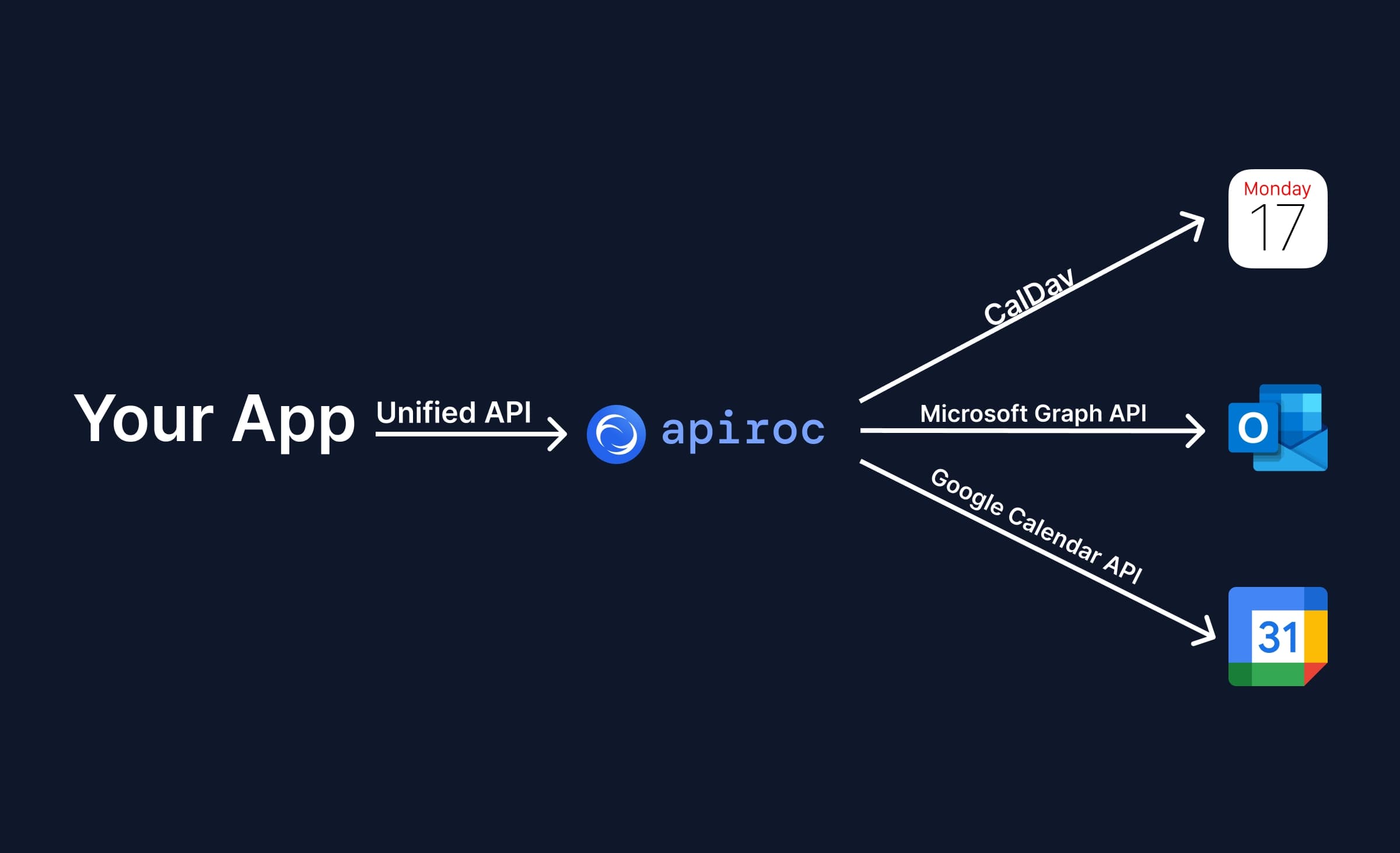
Using a Unified Calendar API such as Apiroc has the following benefits:
- Integrate iCloud Calendar into your application through a well-documented and tested API that follows modern standards. With Apiroc, an iCloud account is connected with the Apple ID email and an app-specific password through a single API call, and events come back as JSON instead of ICS.
- Spend less time developing and maintaining the integration. Most of the work is already done for you: the API, the client, and the edge cases. You also do not have to maintain the integration or fix new edge cases as they show up.
- Integrate other calendar providers besides iCloud Calendar without extra work. Apiroc supports Google Calendar and Microsoft Outlook through the same API, so adding more providers to your application is easy.
- Webhooks for Google Calendar and Outlook, with iCloud support planned. Apiroc sends real-time notifications for Google and Microsoft calendars today. Webhooks for iCloud calendars are planned, and until they ship you still need to poll for iCloud changes, which Apiroc makes simple with sync tokens.
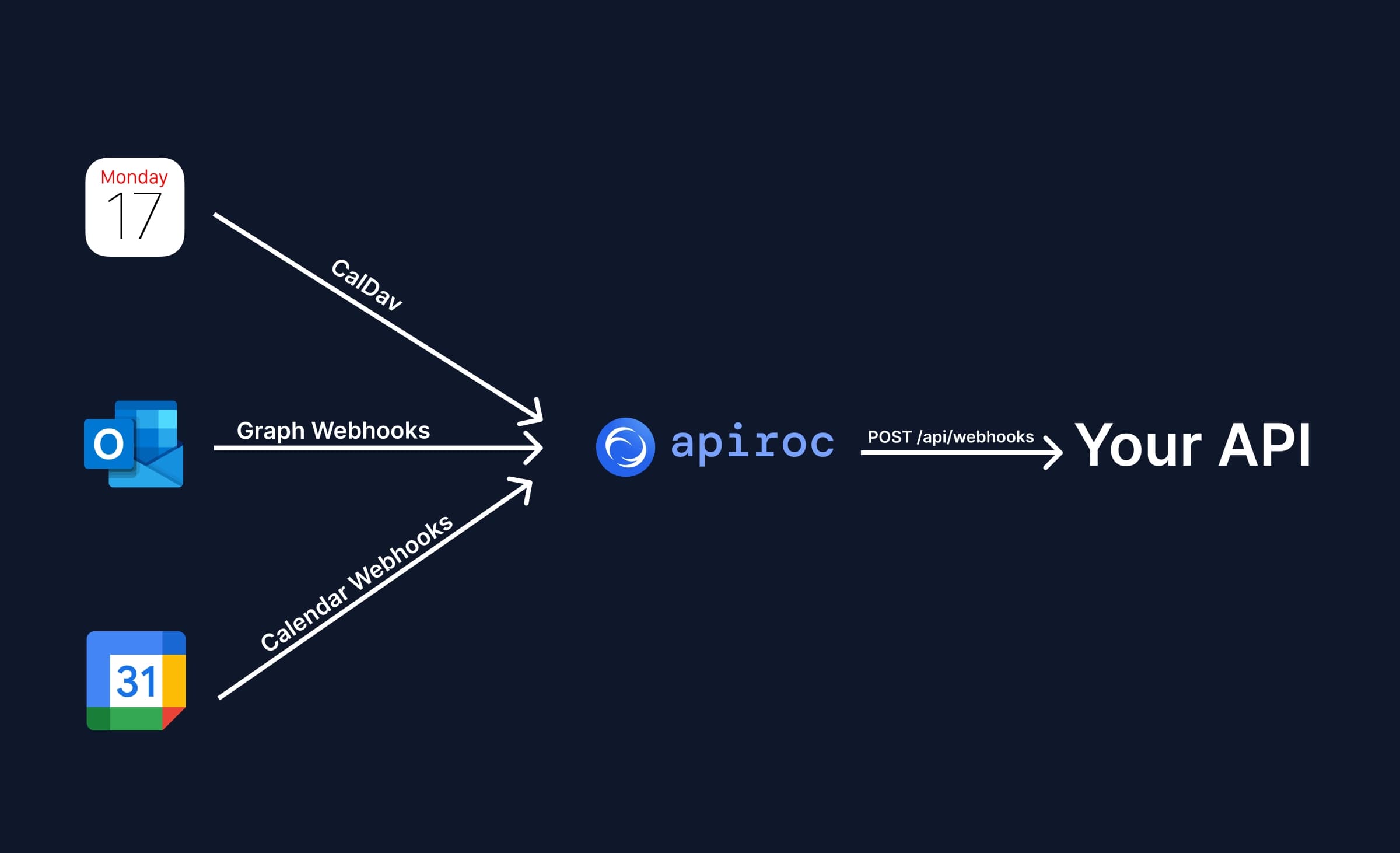
Use Apiroc to integrate iCloud Calendar into your application
You do not have to deal with all the gotchas of integrating iCloud Calendar into your application yourself. Instead, use Apiroc, a Unified Calendar API built by a team with years of calendar integration experience. The free plan includes up to 10 End User Accounts and unlimited API requests. You can sign up for free, no credit card required.
FAQ
What protocol does iCloud Calendar use?
iCloud Calendar uses CalDAV over HTTP and stores events in the iCalendar (ICS) format.
Does iCloud Calendar offer a REST API?
No. CalDAV is the only way to read and write iCloud Calendar data.
How do you authenticate to iCloud Calendar?
You pass the user’s Apple ID (usually the email) and a 16-character app-specific password via Basic Auth over SSL.
Does iCloud Calendar support push notifications or webhooks?
No. You must poll the iCloud server to detect changes.
What libraries can simplify the integration?
tsdav (CalDAV client), ical-generator (build ICS files), and ical.js (parse ICS) handle most low-level details for you.
How do I avoid dealing with CalDAV and ICS directly?
Use a Unified Calendar API such as Apiroc, which wraps iCloud, Google, and Outlook in one modern JSON interface.